AMPAURA AUSTRALIA
Ampaura Connect

Monitor, maintain and operate every site, from one platform

Connect is the energy management system for your whole fleet, whether that's one site or fifty. It watches every asset live, keeps alarms and maintenance in a single queue, and runs each day device by device. Savings are reported against a documented baseline your CFO can check. At the top of every dashboard is the number the whole system is built around: your energy independence, tracked live.
✓
Monitor: every site and every asset, live in one view
✓
Maintain: every alarm and preventive maintenance task across the fleet, in one queue
✓
Operate: the day planned and executed device by device, measured against the baseline
Book a live demo
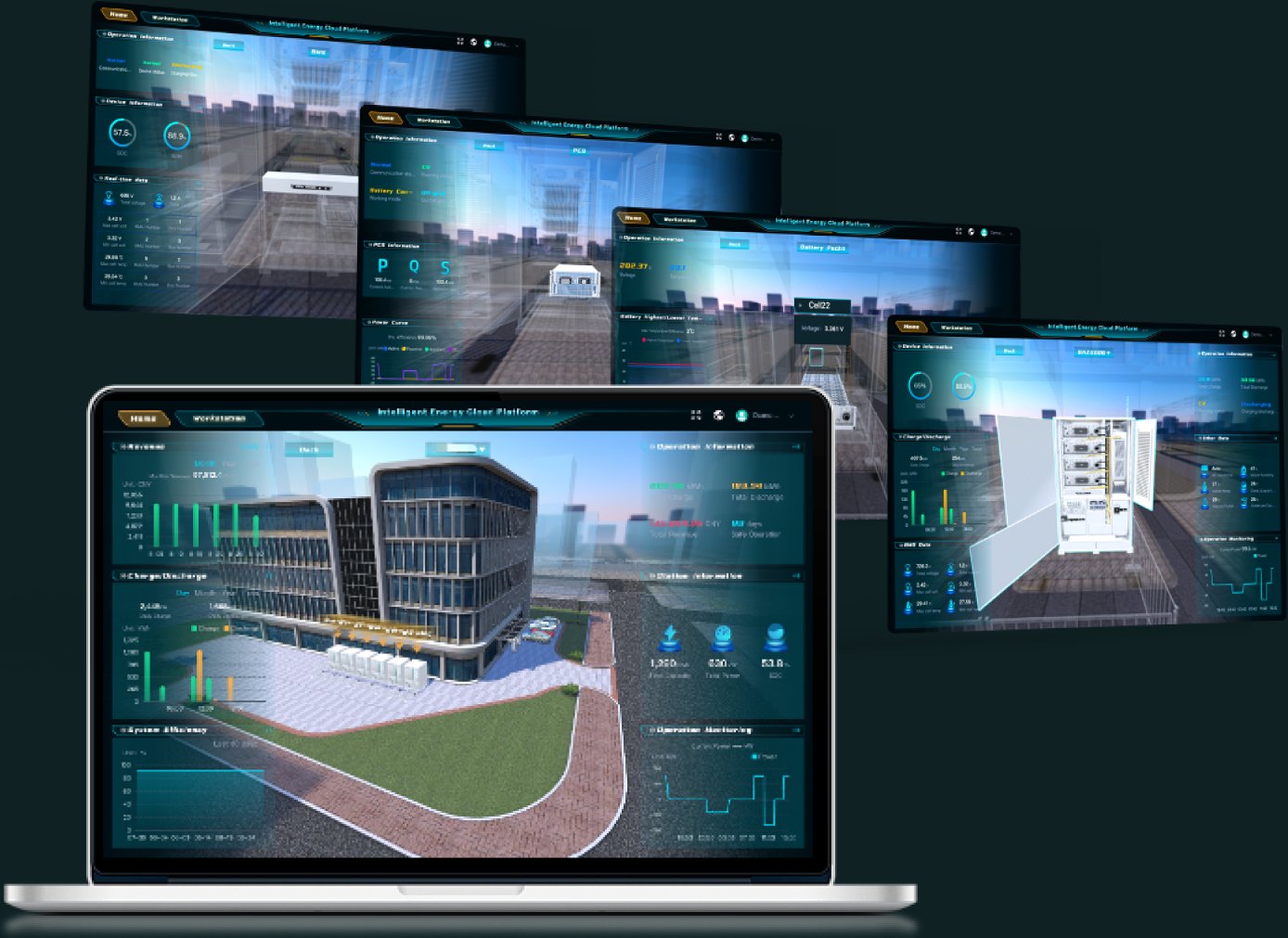
Ampaura Connect dashboards across devices

What it does with your day

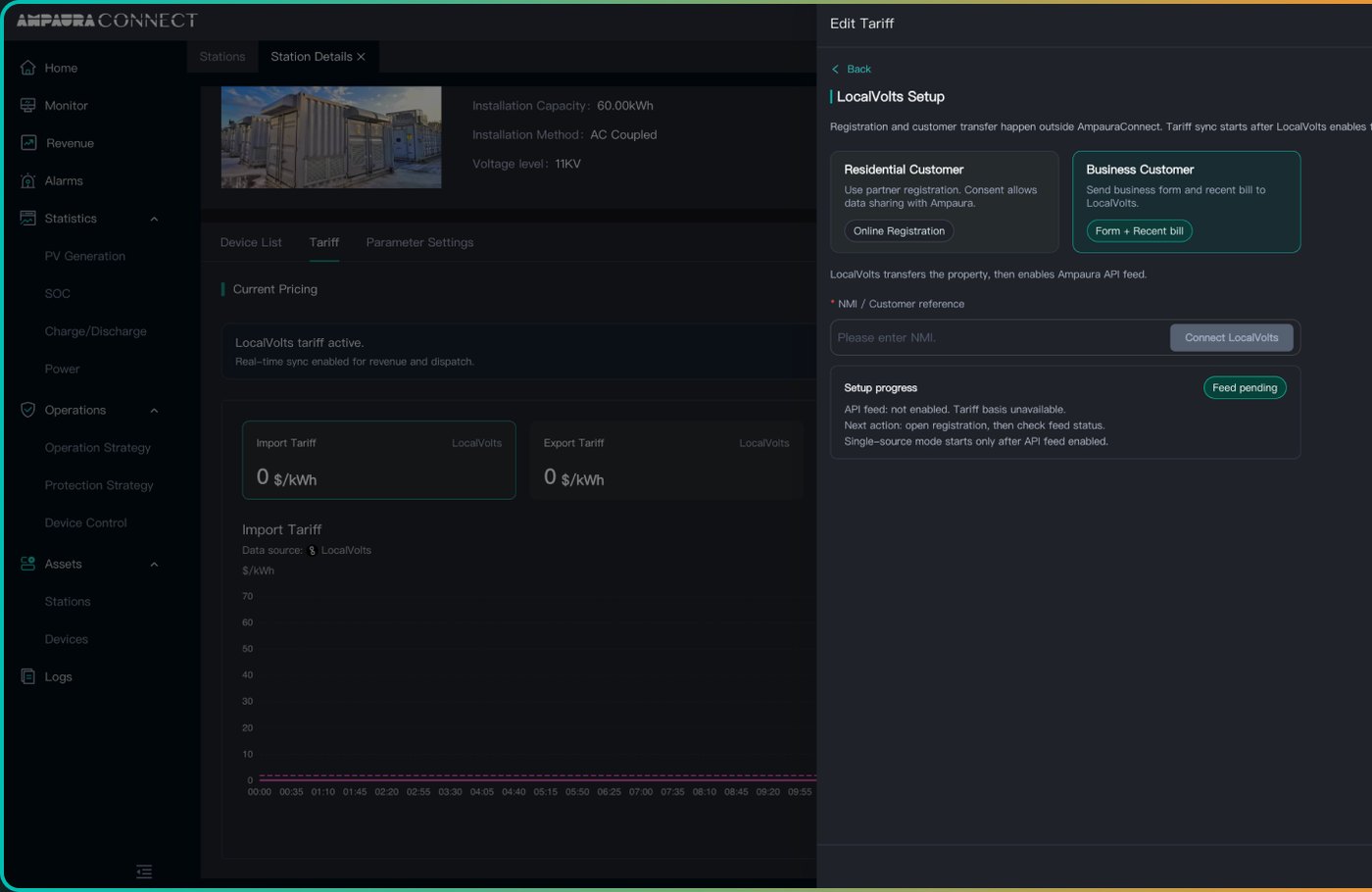
Connect device configuration and protocol setup screen

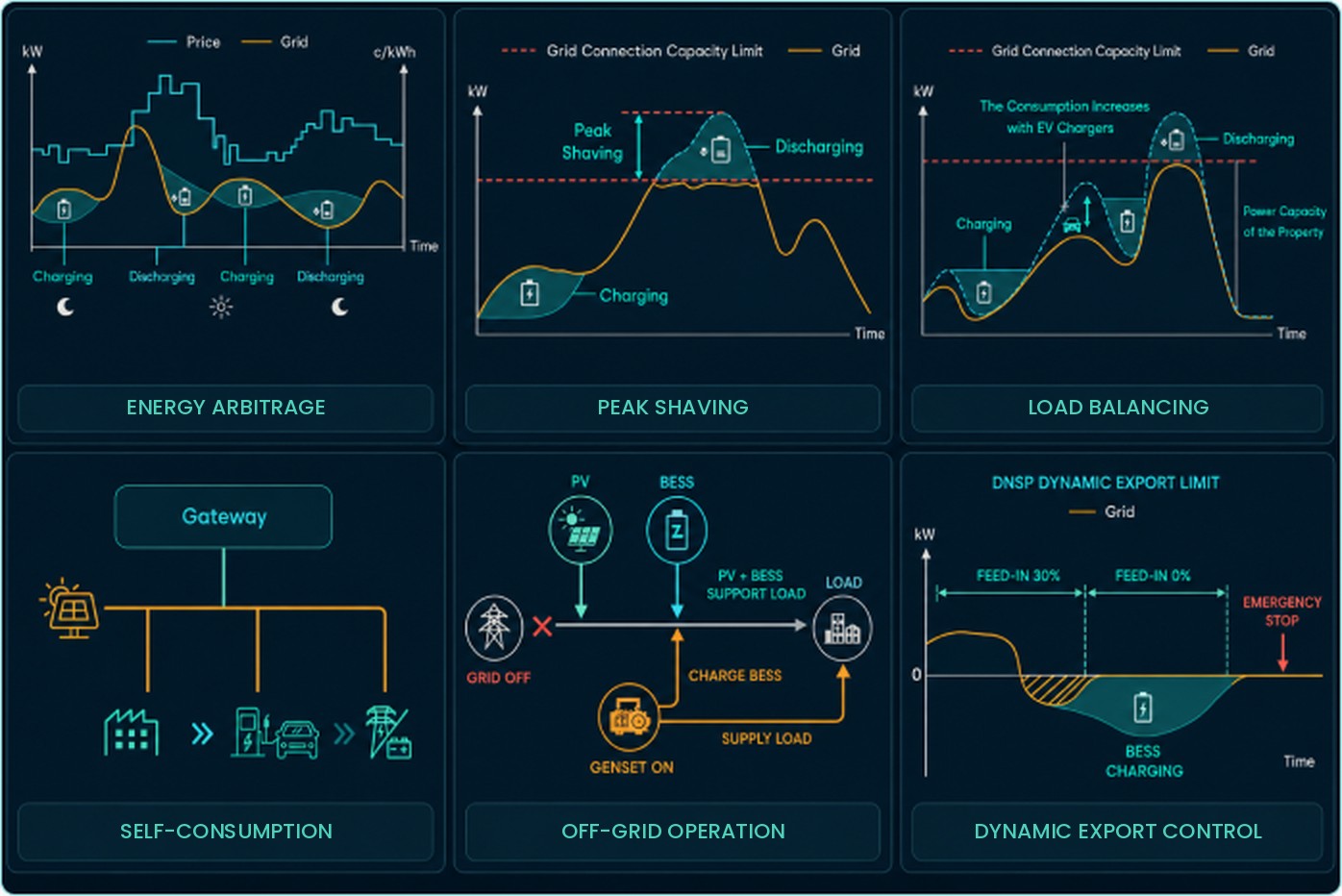
Connect plans the whole day before it starts: when to charge cheap, when to hold ready for the peak, when to bank solar and when to sell. Then it runs that plan device by device and adjusts as the day turns out differently to the forecast. It also does the monitoring, but the planning is the point. Approved virtual power plant integrations today include Amber and LocalVolts.

Peak shaving
Energy arbitrage
Self-consumption
Load balancing
Off-grid operation
Dynamic export control
How AI Mode chooses between strategies →

Savings your finance team can check

Before optimisation starts, the system's performance under a standard strategy is documented as the baseline. Every saving reported after that is the measured difference on meter data over a stated period. Reports export in the formats finance uses, and every number carries its basis.

✓
Savings measured against the documented baseline
✓
Site, period and basis stated on every figure
✓
Exports your accountant can drop straight into the month-end pack
Connect savings and baseline reporting screens

One queue for every alarm, across every site
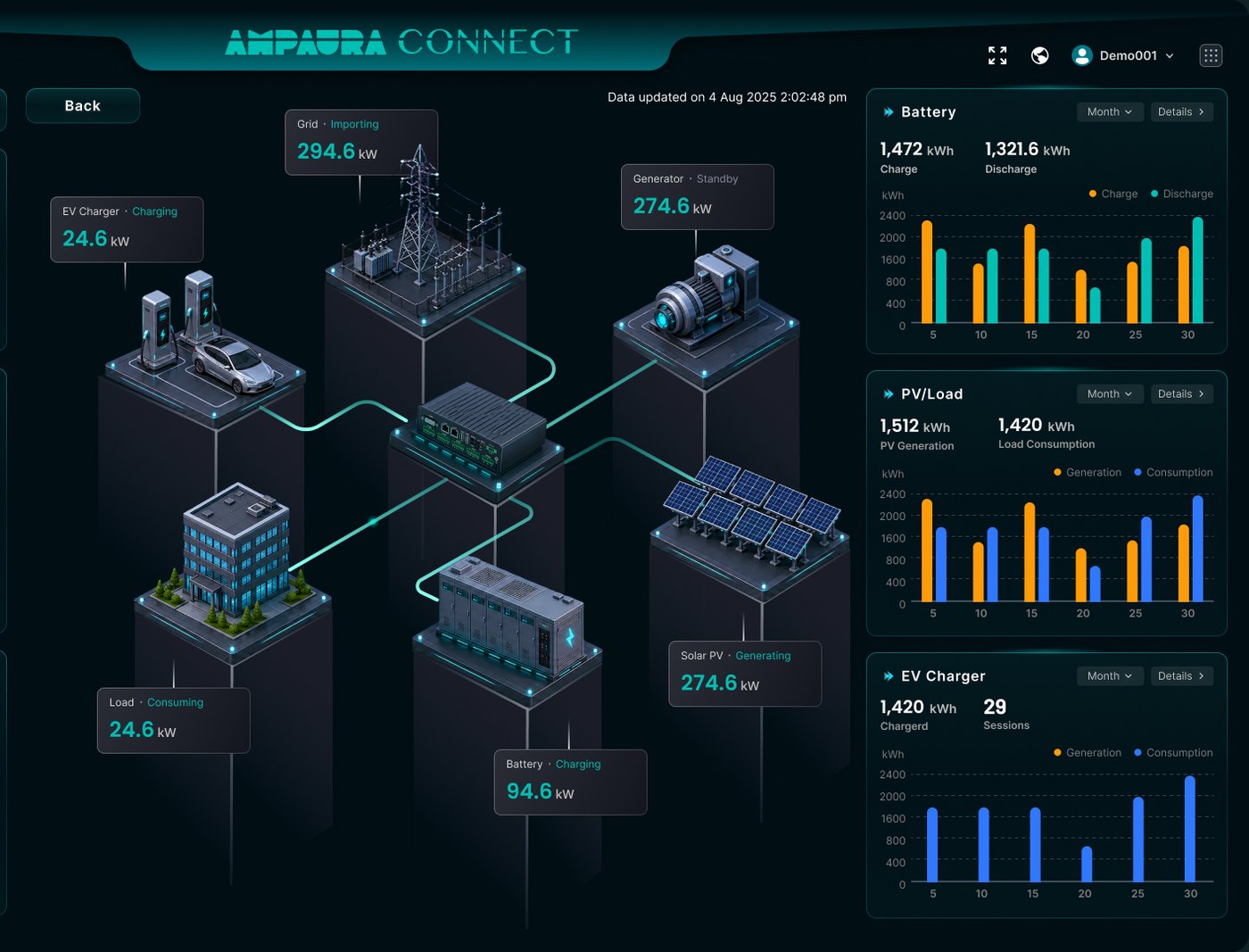
Connect fleet view with every site and asset in one dashboard

Run more than one site and the usual result is five browser tabs and a missed alarm. Connect puts every alarm from every asset into one queue, schedules preventive maintenance across the fleet, and rolls the reporting up so a portfolio reads as easily as a single site.

✓
Alarms triaged across the whole fleet
✓
Preventive maintenance scheduled and tracked in the same place
✓
Reporting rolls up per site, per region or whole portfolio

This works across mixed hardware because the Gateway on each site brings every asset in, whoever made it.

The box that brings them in →
Ampaura Designer

A defensible battery proposal in under 15 minutes

Interval data in, client-ready proposal out. Designer sizes the system against your customer's own half-hourly data, prices it with every assumption stated, and produces a case a CFO can pull apart without it falling over.
✓
Twelve months of bills and interval data drives the whole model
✓
System design and bill of materials out of one tool
✓
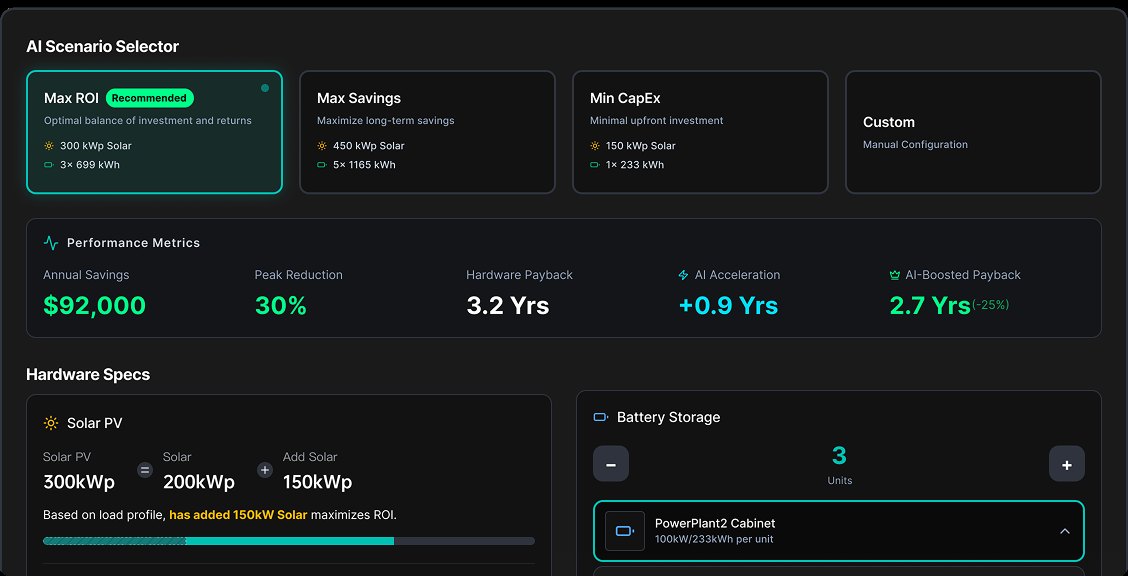
Scenario comparison, so the customer sees the options side by side
✓
Once installed, Connect measures the real result against the proposal
Try Designer free for 14 days
Ampaura Designer scenario comparison screen

Built for the people who quote the job: installers and electrical contractors stepping up into storage. 14 day free trial first, pricing on request.

Fifteen minutes, four screens

From raw bills to a signed-off case, with no spreadsheet in between.
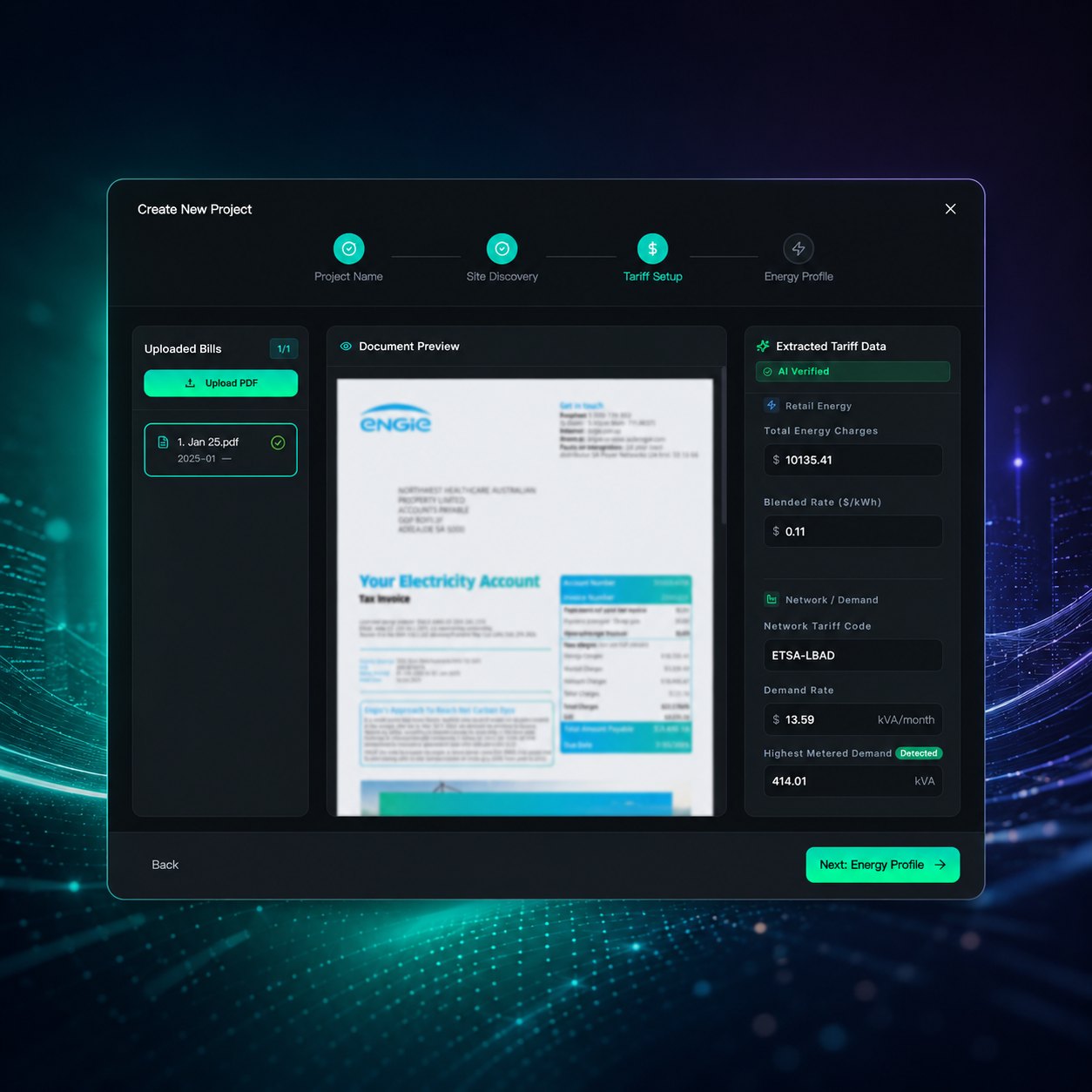
Designer bill and interval data upload

Twelve months of bills and interval data in. Designer reads the tariffs, the demand charges and the seasonality for you.
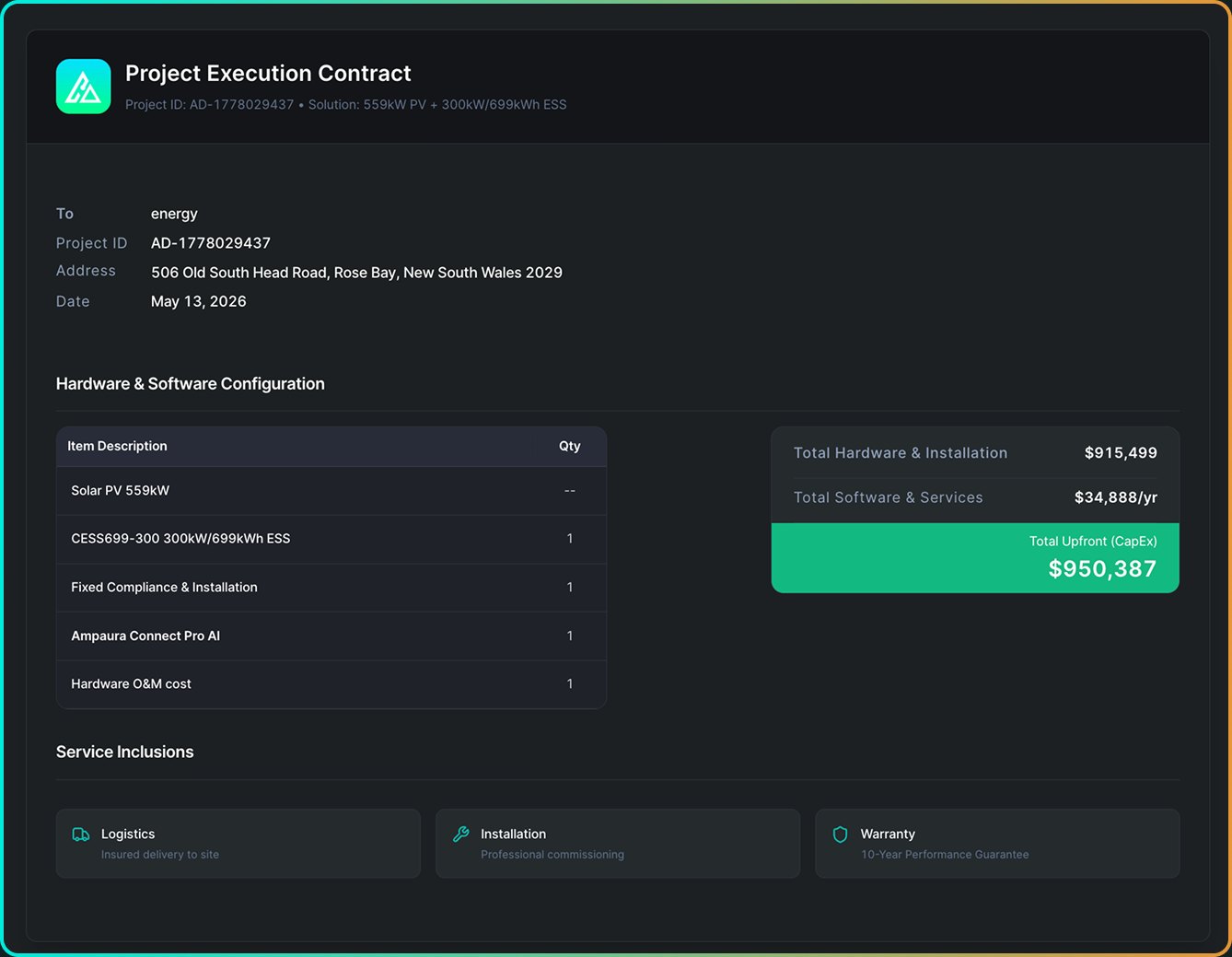
Designer system design and bill of materials

The system sized against the real load shape, with the full bill of materials priced in the same tool.
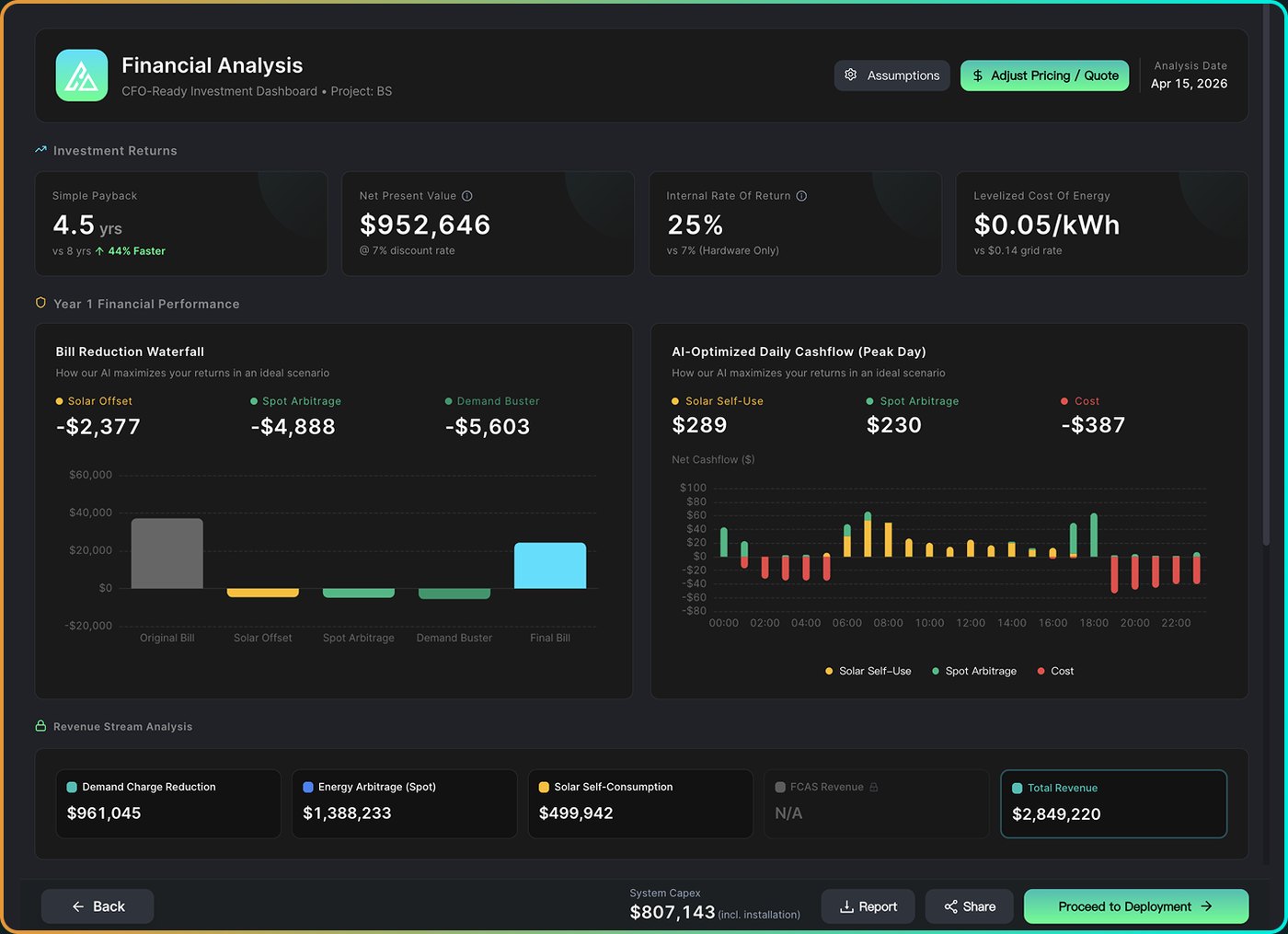
Designer financial case with assumptions

Payback, cash flows and every assumption stated on the page, so any argument is about the inputs.
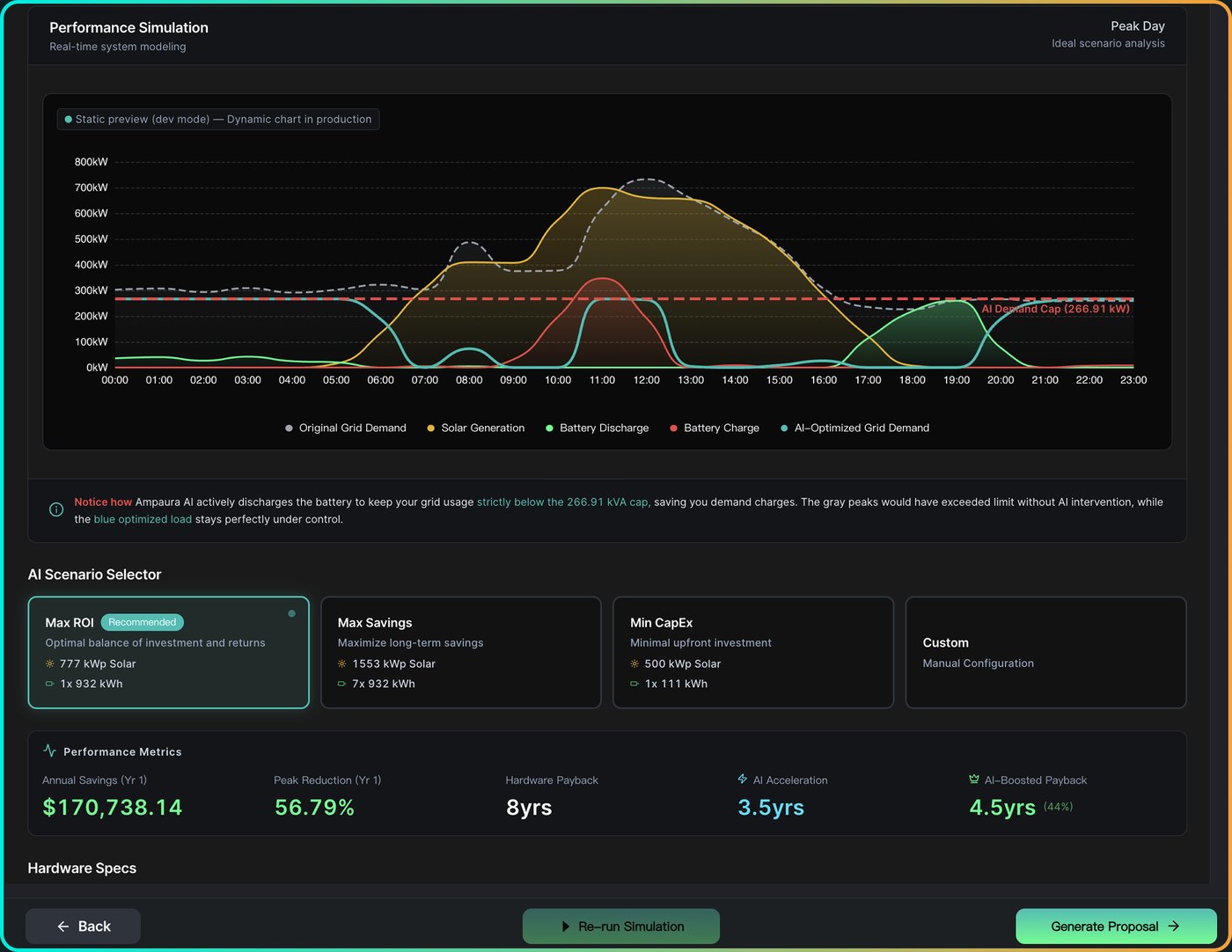
Designer ROI and payback projection

Once installed, Connect measures the real result against the proposal, and that result feeds your next pitch.

What lands in your client's inbox

✓
A client-ready proposal document, branded and defensible
✓
Full bill of materials and compliance scope for the installer
✓
Scenario comparison, so the options are side by side rather than sequential quotes
✓
Incentives as separate line items at current value, never blended into the headline
Built for the people who quote the job

EPCs, electrical contractors and solar installers stepping up into commercial storage. Designer is part of the partner program: 14 day free trial first, pricing on request, training included.

The partner program →

The full Ampaura Designer page goes deeper: every screen from bill upload to signed case, the bill of materials, and exactly what lands in your client's inbox.

Open the Ampaura Designer page →
AI Mode

At least 20% more savings. Real sites have hit 46%.

A fixed charge and discharge schedule is set once at commissioning and goes stale. AI Mode re-learns your load, your weather and your tariff, and rebuilds the plan every day across six dispatch strategies. The difference is measured against a documented baseline, and we model every site individually before estimating what AI Mode will add.
✓
Baseline documented before AI Mode starts, so the uplift is measured
✓
The plan is rebuilt from fresh forecasts, every day
✓
The 46% high comes from a live Australian cold storage site
See the measured results →
The six AI dispatch strategies: energy arbitrage, peak shaving, load balancing, self-consumption, off-grid operation and dynamic export control

One engine, weighted to your site's objective

Every day the optimiser takes four inputs: forecasts for load, solar and price; commercial signals like tariffs and demand charges; the state of your assets; and the site's hard limits. What it does with them depends on your objective. That objective comes out of your own bills and interval data when the system is designed in Ampaura Designer, and the daily plan is weighted to it from then on.

The plan is checked on site against local safety and device limits before anything executes.

The box that does the verifying →
The AI multi-objective optimisation engine: inputs, objectives and control outputs

What is this site solving for?

Dispatch priority

Illustrative. The real weighting comes out of your own bills, your interval data and the objective you set, and it is built in Ampaura Designer before anything is ordered. Two sites on the same tariff can be weighted differently because they want different things.

How we back the number

Before AI Mode switches on, the system's performance under a standard strategy becomes the documented baseline. Every claim after that is the measured difference between the two, on your meter data, over a stated period. If a number ever turns up without its site, period and basis, it didn't come from us.

20%+
additional savings, at least, added by AI Mode
46%
the real-world high, on a live Australian cold storage site
Daily
the plan is rebuilt from fresh forecasts, every day
See it on your load

The full AI energy optimisation page goes deeper: the six dispatch strategies, the optimisation engine behind them, and how the baseline is documented before any number is claimed.

Open the AI energy optimisation page →
Ampaura Gateway

Every asset on site, Ampaura or not, on one platform

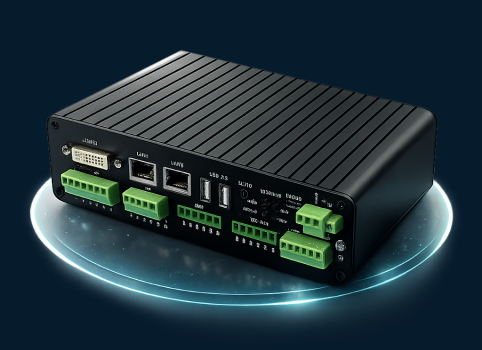
The Gateway (model AURA-IMC-500) sits on site and brings everything into Connect: our hardware, other manufacturers' hardware, the meters and the chargers. It's the reason alarms, maintenance and reporting can all live in one place. You use those features in Connect. The Gateway is what makes them possible.
✓
Brings batteries, inverters, meters and chargers from any manufacturer onto the platform
✓
One place for alarms, maintenance and reporting, fed by this box
✓
Checks every command against the site's real limits, and keeps running if the internet drops
Modbus TCP / RTU
CAN
OCPP 1.6 / 2.0
MQTT
IEEE 2030.5
IEC 61850
Book a live demo
The Ampaura Gateway AURA-IMC-500 industrial controller

Every Connect site runs through a Gateway. It's what lets Connect run hardware we didn't supply.

Open the Ampaura Gateway page

Already running hardware from someone else? The Gateway page lists every tested brand, every protocol it speaks, and how equipment that is not on the list yet gets onboarded.

Check what is on your site →

Ampaura software: Connect, Designer, AI Optimisation and Gateway

One objective, carried from the first bill to the meter

The objective set in Designer at proposal stage is the same objective AI Mode runs the site to once the battery is commissioned. The measured result then comes back to confirm or correct the proposal. Nothing gets re-keyed at handover.

The common setup

ProposalBuilt in a spreadsheet or a vendor tool
InstallHanded over to a different monitoring platform
OperateA fixed schedule, set once at commissioning
ReportNobody checks the proposal against what the site did

Designer, Connect and AI Mode

Your dataTwelve months of bills and interval data, and what you are trying to achieve
Ampaura DesignerThe objective is modelled, the system sized, the case priced with every assumption shown
CommissioningThe design goes in, the objective goes with it
Ampaura ConnectThe same objective runs the site, device by device, every day
AI ModeRe-plans daily against that objective, and the measured result returns to the next proposal
one objective, the whole way

Drag each row sideways to see the full sequence.

Set in Designer

The objective and the tariff model come out of the customer's own bills and half-hourly data. Two sites on the same tariff can be weighted differently because they want different things.

Run by Connect

The same objective drives the daily plan across six dispatch strategies, and the Gateway checks it against local limits before anything executes.

Measured on the meter

The operating result is compared with the documented baseline, which confirms the proposal or corrects it. Either way the next proposal gets better.

The whole system, in one handbook

Designer, Gateway, Connect and AI Mode, from proposal to measured result. Eleven pages.

Download the Solution Handbook (PDF)

Book a live demo

Twenty minutes on a live site. See the fleet view, the AI strategy and the reporting on real data, and bring your hardest questions.